

Selecting Lenses
Making the correct choices for your frame and lens.
It is important to select the right frame and lens for you.
Once you have picked the frame, you will need to enter details about the frame size and select the type of lens and lens quality for you.
Frame Details
The arm length, bridge size, and lens size are read from your current frames.
On the arm of your current frames are the details of your glasses in the following format.
1st Number Square 2nd Number Space or Dot 3rd Number. (see image below)
For example 54 [] 16 140
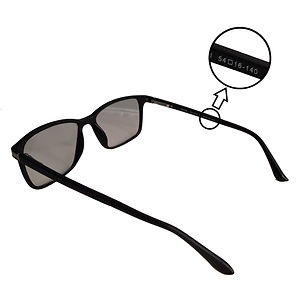
The first number is the lens size (54 in the example above)
The second number is the bridge width (16 in the example above)
The third number is the arm length (140 in the example above)
Most frames have a default range of values, so check that the glasses you want are available.
It may be difficult to read the numbers. To help read the numbers, it is a good idea to take a photograph using your phone. View the picture and zoom in to read the numbers. Remember to get the numbers in focus when taking your photograph. If they are blurred, try again.
Lens Details
Lenses are made depending on your prescription and your needs. You may need glasses for reading, distance (for driving), occupational lenses which are generally for close up to arm length work (for example computer use) or you may want varifocals which have a varying focal range from distance at the top of the lens, to close up at the bottom of the lens.
Standard Lens Type Options
Standard - Standard Lenses with built in anti scratch
Photochromic - Automatically darken in bright UV light
Transition Xtra - Darkens in bright light indoors and outdoors
Varifocal Lens Type Options
Standard - Standard Lenses with built in anti scratch
Mid-Range - Gives wider field of vision than standard lens with anti scratch
Top-Range - Widest field of vision. Clear vision in all directions
Photochromic - Automatically darken in bright UV light
Transition Xtra - Darkens in bright light indoors and outdoors
Essilor Comfort Max - Offers maximum field of vision and smoothest transition between distances.
Other Options
Anti-Reflective are designed to reflect away light and glare.
Blue Filter are designed to filter out high-energy visible (HEV) blue-violet light emitted by digital screens, LED lighting, and the sun. They are recommended for computer use.
Thin 1.6 lenses are 20-30% thinner and lighter lenses. We recommend this option for +4 / -4 higher prescriptions. To work out if you have a higher prescription add the Spherical (Sph) Cylinder (Cyl) values together from your prescription. If they are greater than +4 or less than -4 you have a higher prescription. This option will make the lenses thinner and lighter to wear.
Thin 1.67 lenses are 30-40% thinner and lighter lenses. We recommend this option for high +6 / -6 prescriptions. To work out if you have a higher prescription add the Spherical (Sph) Cylinder (Cyl) values together from your prescription. If they are greater than +6 or less than -6 you have a higher prescription. This option will make the lenses thinner and lighter to wear.
Select No Extra if no extra coatings are needed.
Prescription Details
You need to enter the prescription details when you order. This will be the prescription details the optician gave you when you had your last test. To get the best use of your glasses, we recommend that you have had a test within the past 2 years, as your eyesight can change especially when you are older. Tests should be free for under 18s and over 60s from a reputable optician. If you have to pay for your eye test, prices can vary, so it is best to shop around. You may also find that your place of work may offer to pay for an eye test or provide a voucher if you spend a lot of time using a computer or need glasses to drive as your main job.
Contact
If you wish to enquire what is best for you, please email and ask. We are happy to help you pick the best choice for your prescription.